
You’ve paid to bring a new patient through the door. Your team found them a slot, answered their questions, and got everything ready.
Now it’s 10:10, their appointment was at ten, and someone’s asking, ‘Did they ever confirm?’.
Cue the scramble.
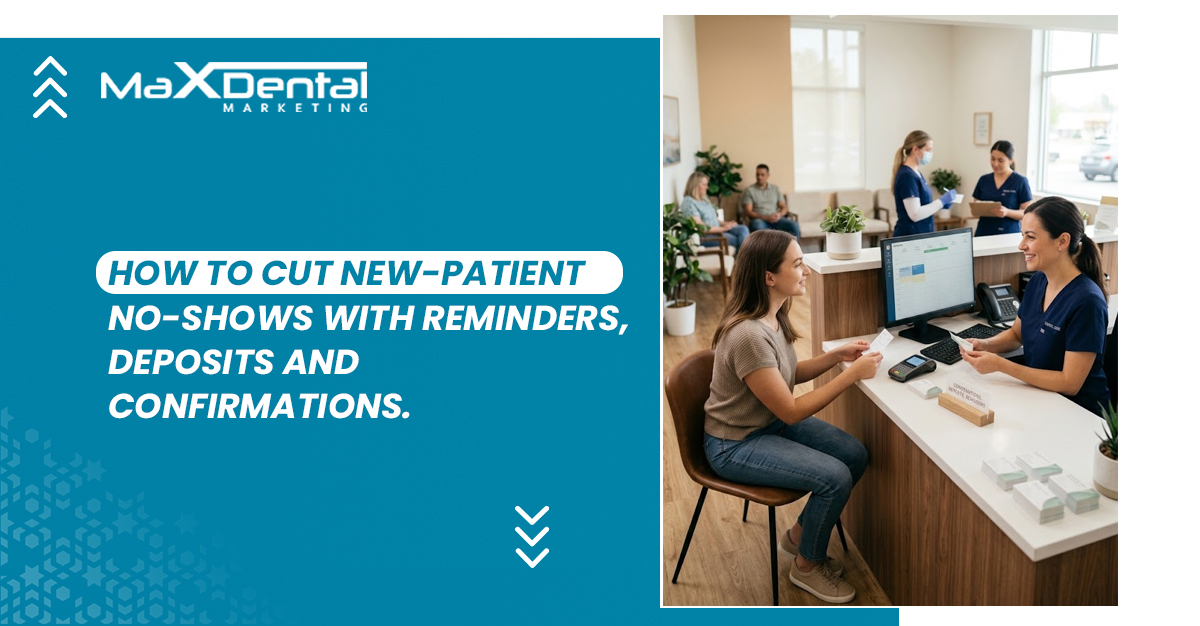
An empty chair is frustrating enough without wondering what your practice could’ve done differently. Effective dental appointment reminders help patients keep their first visit on track by making the details clear and the next step easy. Reducing no-shows takes useful reminders, active confirmations, transparent deposit and cancellation terms, and timely follow-up. A patient who needs help should know how to reach you before their appointment becomes a missed one.
Your front desk shouldn’t have to play detective every morning.
We’ll walk through what to send, when to ask for a response, how to explain deposits without making the welcome awkward, and what to do when a patient goes quiet. Give your team a plan before that ten o’clock gap opens up.
How A First Visit Can Unravel Before the Day Arrives
Your team knows what a first appointment involves. Your new patient might be wondering whether they’ll need an hour off work or half a day. “You’re booked!” can leave quite a few questions hanging.
With professional appointment setting, your welcome should include the practical details patients need to plan.
Before the patient hangs up or closes the booking page, clarify:
- What their first visit includes and how long it should take.
- Which forms or records they should prepare.
- Where to go and how early to arrive.
- Who can answer cost or insurance questions.
- How to request a different time.
Imagine someone booking during a lunch break. Knowing the visit takes longer lets them arrange time off or ask for another slot. You can’t anticipate every disruption, but you can help them prepare.
Also Read: How Professional Appointment Setting Increases Dental Bookings
What to Send Between ‘You’re Booked’ and ‘See You Soon’
Three messages saying “Don’t forget!” still leave patients wondering where to park or how to change their appointment. Each message should help them do something useful.
Use this example sequence as a starting point to adapt and test. Adjust the timing around your cancellation deadline and how far ahead the patient booked.
| Touchpoint | What the message should accomplish |
| Immediately after booking | Verify the reserved date, time, location, and next step |
| Before the cancellation deadline | Request confirmation while there’s time to rearrange |
| Closer to the visit | Provide concise directions and arrival instructions |
| After an unanswered request or patient question | Prompt staff to follow up and address what’s unresolved |
Match the channel to the task. A text can carry a quick confirmation request. Email gives preparation instructions room to breathe. For patients already using your practice’s app, mobile app reminders can provide another convenient route.
A 2025 study of online scheduling and appointment attendance found different results across two ophthalmology settings; a useful reason to test your approach against your own attendance data.
Keep the sequence sensible:
Someone booking this morning doesn’t need a week’s worth of messages by lunch. Update or stop reminders as soon as their appointment changes.
Your Text Arrived. Has Your Patient Confirmed?
Delivered looks reassuring on a dashboard. It tells you the message arrived, but your patient could still be wondering whether they can leave work early. With two-way appointment confirmations, patients can respond and your team can see which appointments need attention.
Keep the statuses clear:
- Confirmed: The patient has actively acknowledged the appointment.
- Needs help: A question or concern needs an answer.
- Rescheduling requested: The change needs to be completed and recorded.
- No response: Your team needs to review the next step.
- Delivery failed: Check the contact details or try the patient’s preferred alternative.
Use a dedicated CRM to keep responses organized, and assign someone to review them at set times throughout the day. Decide which questions they can answer and which need another team member. ‘Someone will check’ has a habit of becoming nobody’s job.
Silence alone shouldn’t cancel a booking; releasing a slot requires a clearly communicated process and appropriate staff review.
Also Read: Top Benefits of Using a CRM System for Dental Clinics
What Should Your Reminder Actually Say?
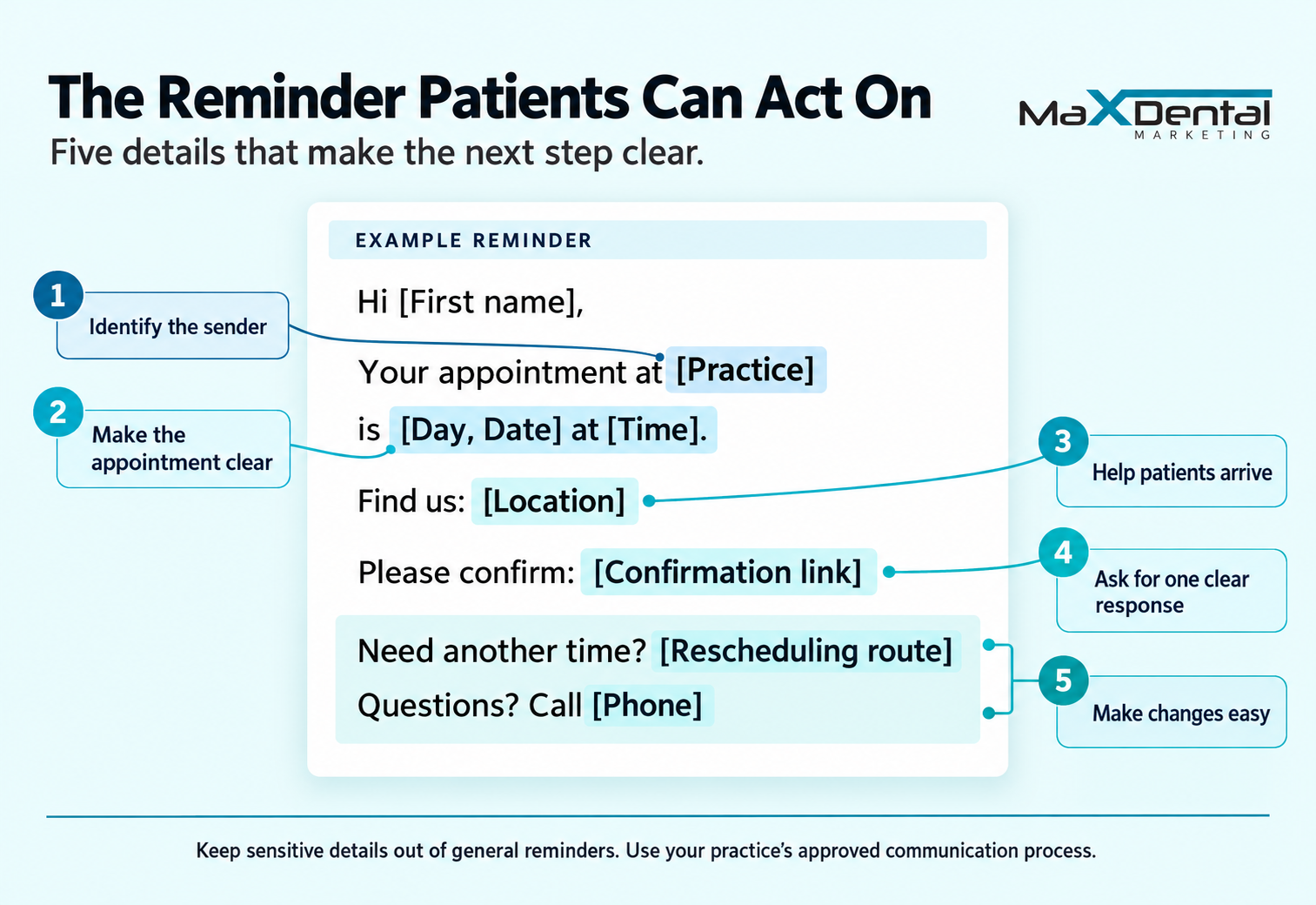
Patients shouldn’t need to hunt through three messages to find the address. Useful dental appointment reminders put the essentials together and make responding easy. Adapt these examples to your practice’s actual process.
A Text That Makes Confirming Easy
Hi [First name], your appointment at [Practice] is [Day, Date] at [Time], at [Location]. Please [confirmation action]. Need another time? [Rescheduling route]. Questions? Call [Phone].
Use “Reply YES” only if your system records that response and someone monitors incoming messages. Otherwise, provide a working confirmation link or phone number. An invitation to reply needs someone listening.
An Email That Covers the First-Visit Details
Subject: Your visit to [Practice] on [Date]
Hi [First name],
We’re looking forward to welcoming you on [Day, Date] at [Time].
Find us: [Address and directions]
Before your visit: [Arrival time and preparation instructions]
Please confirm: [Confirmation link]
Need another time or have a question? [Rescheduling route] or call [Phone].
See you soon,
[Practice team]
Keep sensitive clinical details out of general templates. Follow HHS guidance on patient email communication, including checking addresses, limiting disclosed information, and respecting reasonable communication preferences.
Where AI Can Help With Replies, and When Staff Should Step In
A scheduled reminder doesn’t need AI. Understanding ‘Tuesday works, but can I come later?’ takes interpretation. As you evaluate dental appointment confirmation services, ask how replies become recorded confirmations, requests, or staff tasks.
Recognize straightforward replies.
A suitably configured AI system may recognize simple confirmations and rescheduling requests.
It should distinguish “I need another time” from a completed booking change. Your patient still needs an agreed replacement slot.
Route questions to the right person.
“Will my insurance cover this?” deserves an informed answer. Approved routing rules can direct cost, anxiety, or preparation questions to staff who can help.
Nobody wants a cheerful “You’re confirmed!” in response to a concern.
Keep calendar changes accountable.
Verify the patient and appointment, record actions, and send unclear replies for review. Set approval rules before allowing software to change bookings.
At Max Dental Marketing, we help practices manage scheduling, confirmations, and patient communication. We’ll discuss your workflow and where your team needs support.
Also Read: Automate Dental Appointments Without Losing the Human Touch
Asking for a Deposit? Explain Where the Money Goes
“Can we take a payment to reserve your visit?” can feel abrupt to someone who hasn’t met your team yet.
If your practice requires a dental appointment deposit, explain its purpose before requesting payment. A deposit credited toward care is an advance payment; a missed-appointment fee is a separate charge governed by your policy. Patients shouldn’t have to guess which you’re collecting.
Before they pay, patients should understand:
- Amount and purpose: What they’re paying and why.
- Appointment credit: How the payment applies to their visit.
- Refunds or transfers: When either option is available.
- Late cancellations: What happens to the deposit.
- Exceptions: How individual circumstances are reviewed.
- Questions: Whom to contact for an answer.
Follow ADA guidance on developing a financial policy: document the terms and check applicable laws and payer requirements. Use a secure payment process and record the patient’s acknowledgment.
Then assess the added booking step: are patients completing reservations, raising affordability concerns, or attending more consistently? A deposit deserves the same scrutiny as any change to your patient experience.
Changing or Missing a Visit: What Patients Need to Know
Make Rescheduling Easy to Request
A patient’s plans can change after your phones switch off. Your dental cancellation policy should explain how much notice you need, which contact routes you accept, and how you calculate the deadline.
Be specific about weekends and office closures. Tell patients how you’ll acknowledge their request and confirm any replacement appointment. They shouldn’t have to wonder whether a voicemail reached anyone.
Handle Missed Visits With a Consistent Process
Your dental no show policy should guide what happens next: verify that the appointment was missed, check for earlier messages, and record any explanation the patient provides. Contact them respectfully, explain applicable terms already disclosed, and offer an appropriate next step.
Give staff a consistent process for reviewing emergencies and other exceptions, including who can approve them.
Which Appointments Need a Follow-Up Before Tomorrow?
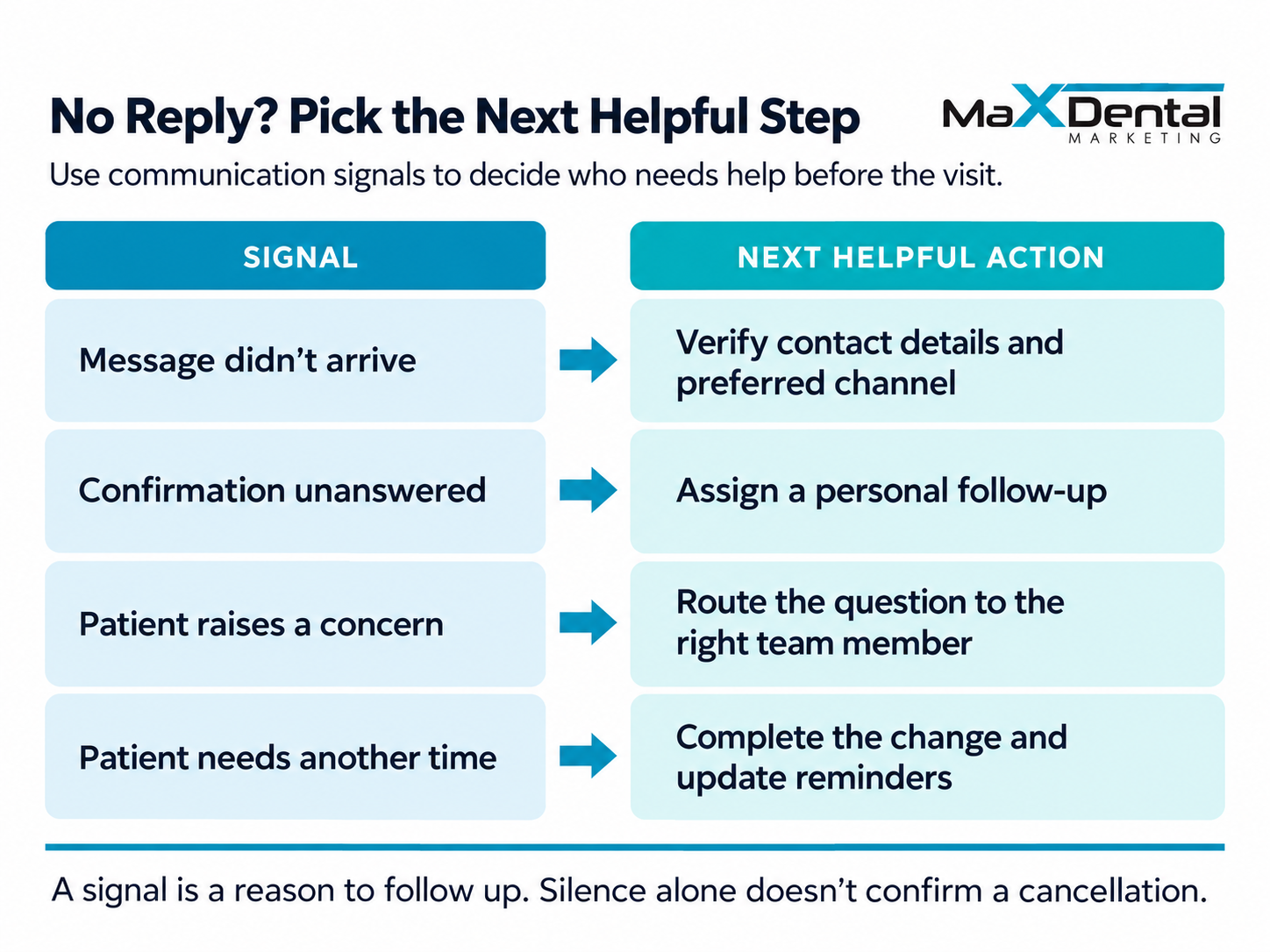
Tomorrow’s schedule might look full while a few bookings still need attention. A failed message, unanswered confirmation, unresolved question, or appointment booked months ago can prompt a closer look.
With a dental CRM with automated reminders, your team can organize follow-up around those signals. Start by checking what’s unresolved and offering help; none of these signals proves a patient won’t arrive.
Predictive models take this further by estimating no-show likelihood from appointment data. A 2026 review of machine learning for dental no-show prediction found promise but called for larger studies and real-world evaluation.
Any model needs validation against your practice’s patients and workflow. Use its findings to prioritize helpful conversations, with staff judgment guiding decisions. A risk estimate shouldn’t become a label or an automatic penalty.
Your Office Is Closed BUT Patients Still Have Questions
A Phone Call Can Clear Things Up
Some questions need a conversation. With 24/7 dental call answering, patients can explain what they need after hours. Give the answering team approved guidance and a clear process for passing unresolved questions to your staff.
Let Website Visitors Ask While They’re There
Someone checking your address at nine might also wonder about parking. Through live chat for dental practices, patients can ask practical questions while browsing. Explain when anything requiring office input will receive a response.
Keep Appointment Details Handy for App Users
A dental appointment app can offer convenient access for patients already using it. Keep other contact options available; downloading an app shouldn’t become homework before a first visit.
Every route needs an owner, clear response expectations, and a reliable handoff. Nobody enjoys explaining the same question twice.
Also Read: Benefits of a Mobile App for Your Dental Practice
A Missed Visit Can Still Become a First Visit
The appointment passed, but the invitation can stay open.
Thoughtful no-show recovery emails give patients a way back:
“We missed seeing you today. If you’d like to arrange another visit, please contact us at [Phone].”
Ask whether there’s anything they need help with, and give them room to explain. Your team can listen without assuming what happened.
Measurement Example:
If 12 of 100 scheduled new-patient visits were missed, your no-show rate is 12%. Track late cancellations and completed rebookings separately so you can see both attendance gaps and successful returns.
Also Read: Dental Email Marketing Campaigns That Bring Patients Back
Help Your Next New Patient Make It Through the Door
Your team puts care into preparing for a first visit. Give patients the same thoughtful welcome between booking and arrival. Clear directions, useful dental appointment reminders, fair terms, and someone ready to answer questions can help them feel prepared to show up. That’s a better start for everyone and a little less morning detective work for your front desk.
At Max Dental Marketing, we help practices with appointment setting, confirmations, and patient communication, with support shaped around how your office works. Let’s look at unanswered messages, attendance gaps, and follow-up responsibilities, then identify practical improvements that help your team welcome that next new patient.
Schedule a free consultation to walk us through what happens after someone books.
Frequently Asked Questions
What is a new-patient no-show?
A new-patient no-show happens when someone misses their first scheduled visit without canceling beforehand. Record communicated cancellations separately, including late ones, so your figures remain useful.
What’s the difference between a reminder and a confirmation?
A reminder provides appointment details and prompts action. A confirmation records the patient’s acknowledgment that they plan to attend. Message delivery alone doesn’t establish that acknowledgment.
Why should practices track new-patient attendance separately?
Separate tracking shows how many booked patients reach their first visit. It helps your team investigate gaps between attracting interest, securing a booking, and welcoming someone.
Can we improve follow-up without replacing our scheduling software?
Possibly. Check what your current software supports, including replies, reminders, and staff tasks. Then review integration requirements and responsibilities before deciding whether another tool is needed.
Can we keep staff approval for appointment changes?
Yes, you can automate dental appointments while retaining staff approval where your system supports it. Define which actions require review, and test those rules before launch.
Who responds when a patient replies after office hours?
Assign an answering service or designated team member to review replies within agreed hours. Tell patients when to expect an answer and document the handoff to office staff.
How should reminders work for minors or shared family numbers?
Verify the appropriate recipient and contact details before sending. Record communication preferences, limit message details, and follow your practice’s privacy procedures for guardians and shared numbers.
Can patients receive reminders in their preferred language?
Check which languages your system and staff support. Use reviewed templates, record each patient’s preference, and arrange a reliable way to handle replies in that language.
Should promotional emails share the reminder workflow?
Keep their purposes and sending rules separate. With email marketing for dentists, use appropriate permissions and preferences so promotional choices don’t accidentally interrupt necessary appointment communication.
What should we bring to a consultation about our booking process?
Bring booking scripts, follow-up steps, software details, and aggregate attendance figures. Note who handles replies and where delays occur. You don’t need to send identifiable patient records.